One of the most common questions in FPS gaming is: “What sensitivity should I use?” Many players search for the “perfect settings,” hoping to instantly improve their aim. However, sensitivity and DPI are not one-size-fits-all settings. They are deeply personal and depend on your playstyle, your setup, and how your body interacts with your mouse.
In games like Valorant, Counter-Strike 2, and Apex Legends, sensitivity affects every aspect of your gameplay. It determines how fast your crosshair moves, how accurately you can track targets, and how consistently you can land shots. Even small changes in sensitivity can have a significant impact on your performance.
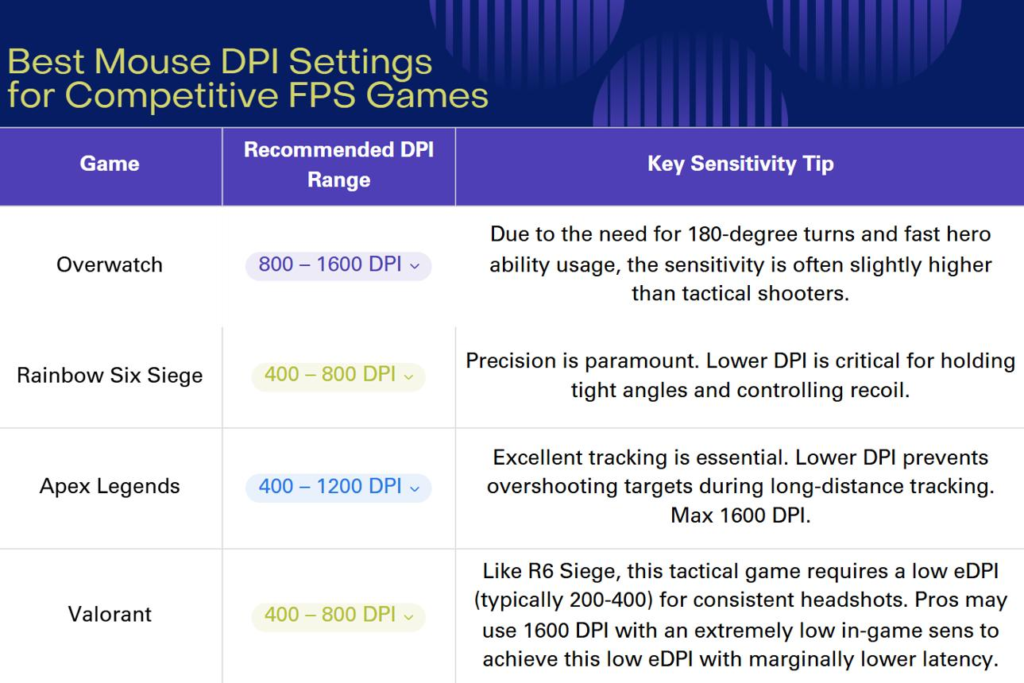
Another important concept is DPI (dots per inch), which measures how sensitive your mouse is to physical movement. DPI works together with in-game sensitivity to create your overall sensitivity. Understanding how these two settings interact is essential for finding a setup that feels natural and consistent.
Many beginners make the mistake of copying professional players’ settings without understanding why those settings work. While pro settings can be a useful reference, they are not guaranteed to work for everyone. Factors such as desk space, mousepad size, grip style, and personal comfort all play a role in determining the best sensitivity for you.
Consistency is the most important factor. Once you find a sensitivity that feels comfortable, sticking with it allows your brain to build muscle memory. Changing sensitivity too often can slow down your progress and make your aim feel inconsistent.
This guide will explain how sensitivity and DPI work, how to find the right settings for your playstyle, and how your overall setup influences your aim. Instead of giving a single “best” setting, it will help you understand the principles behind good sensitivity so you can make the right choice for yourself.
Top Sensitivity Styles


Low Sensitivity (Arm Aim)
Low sensitivity is commonly used by professional players, especially in tactical FPS games. It requires large arm movements to move the crosshair, which allows for more precise control.
Advantages:
- Better accuracy
- Easier micro-adjustments
- More consistent aim
Disadvantages:
- Requires large mousepad
- More physical effort
Low sensitivity is ideal for players who prioritize precision over speed.
Medium Sensitivity (Balanced Approach)
Medium sensitivity provides a balance between speed and control. It allows for both arm and wrist movement, making it versatile for different situations.
Advantages:
- Flexible movement
- Easier to adapt
- Balanced performance
Disadvantages:
- Less specialized
This is a good starting point for most players.
High Sensitivity (Wrist Aim)
High sensitivity relies mostly on wrist movement. It allows for very fast crosshair movement with minimal physical effort.
Advantages:
- Fast reactions
- Less desk space required
Disadvantages:
- Harder to control
- Less consistent for precision
High sensitivity is often used in fast-paced games but is less common in tactical shooters.
Why It Matters for FPS


Sensitivity directly affects how you aim and react.
First, it determines your tracking ability. Lower sensitivity allows smoother tracking, while higher sensitivity requires more precise control.
Second, it affects flick shots. A sensitivity that is too high can make it difficult to stop accurately, while one that is too low can slow down your reactions.
Third, it influences recoil control. Consistent sensitivity helps you manage weapon patterns more effectively.
Finally, it impacts muscle memory. Using the same sensitivity consistently allows your brain to learn and repeat movements accurately.
Pros and Cons of Different Sensitivity Settings
Low Sensitivity
Pros:
- High precision
- Consistent aim
- Better control
Cons:
- Requires more space
- Slower turning speed
High Sensitivity
Pros:
- Fast movement
- Quick reactions
Cons:
- Lower accuracy
- Harder to control
Medium Sensitivity
Pros:
- Balanced performance
- Easier to adapt
Cons:
- Not optimized for specific playstyles
Buying Guide (Setup That Supports Sensitivity)


Your setup should match your sensitivity.
If you use low sensitivity:
- Use a large mousepad
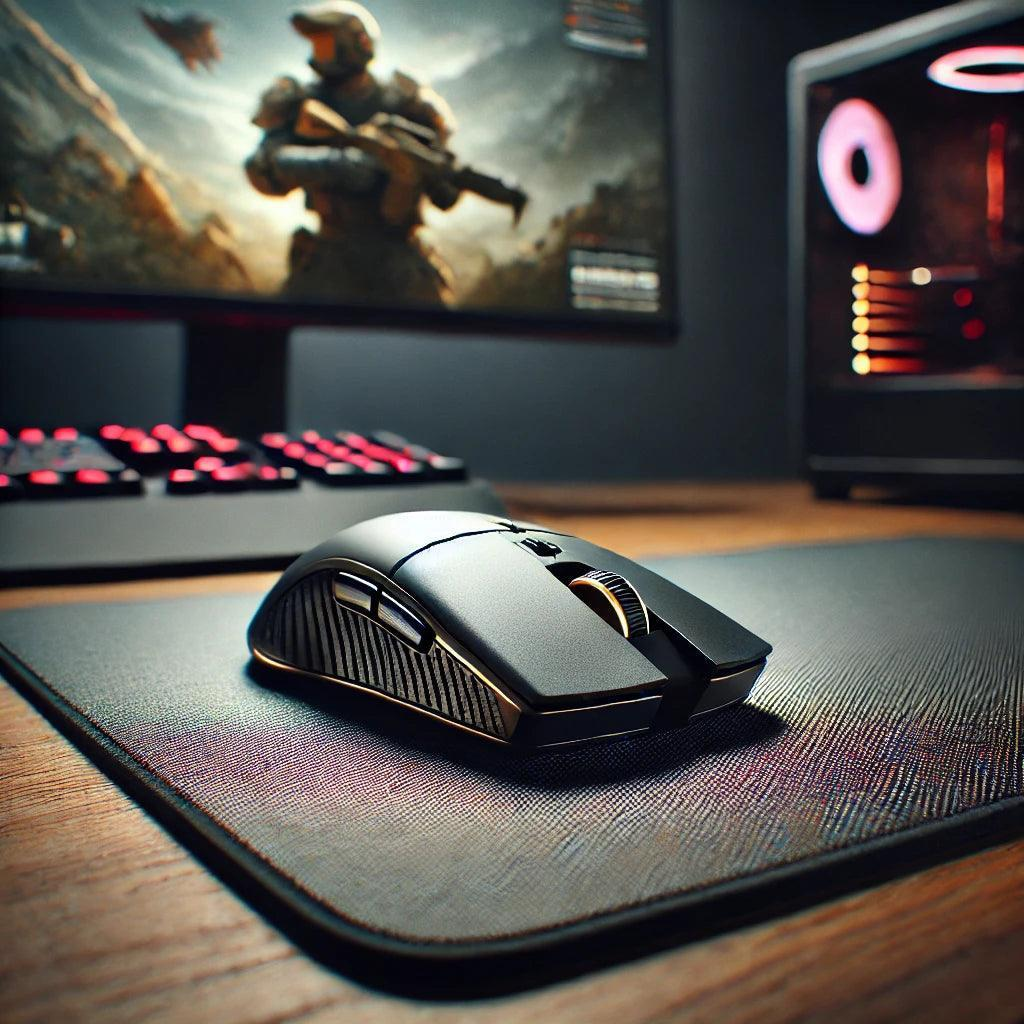
- Choose a lightweight mouse
- Ensure enough desk space
If you use high sensitivity:
- Focus on control
- Use a stable surface
Your keyboard and desk setup should also support comfortable movement.
How to Find Your Perfect Sensitivity
Start with a comfortable DPI, such as 400 or 800.
Adjust your in-game sensitivity gradually.
Test your aim in real matches, not just training.
Focus on consistency rather than quick results.
Avoid changing settings too frequently.
Real Gameplay Impact
Players with optimized sensitivity perform more consistently.
They react faster, aim more accurately, and feel more confident.
Over time, this leads to better results and steady improvement.
Conclusion
Sensitivity and DPI are fundamental to FPS performance. They affect every aspect of your gameplay, from aim to movement to reaction time. While there is no universal “best” setting, understanding how sensitivity works allows you to find the right balance for your playstyle.
The key is consistency. Once you find a setting that feels natural, stick with it and build muscle memory over time. Combined with a well-optimized setup, the right sensitivity can significantly improve your performance and help you reach a higher level of play.
답글 남기기